
Microsoft Dynamics 365 Business Central
ERP Built for Growing Canadian Businesses
One system for finance, inventory, sales, and operations — every number current, every team looking at the same one.


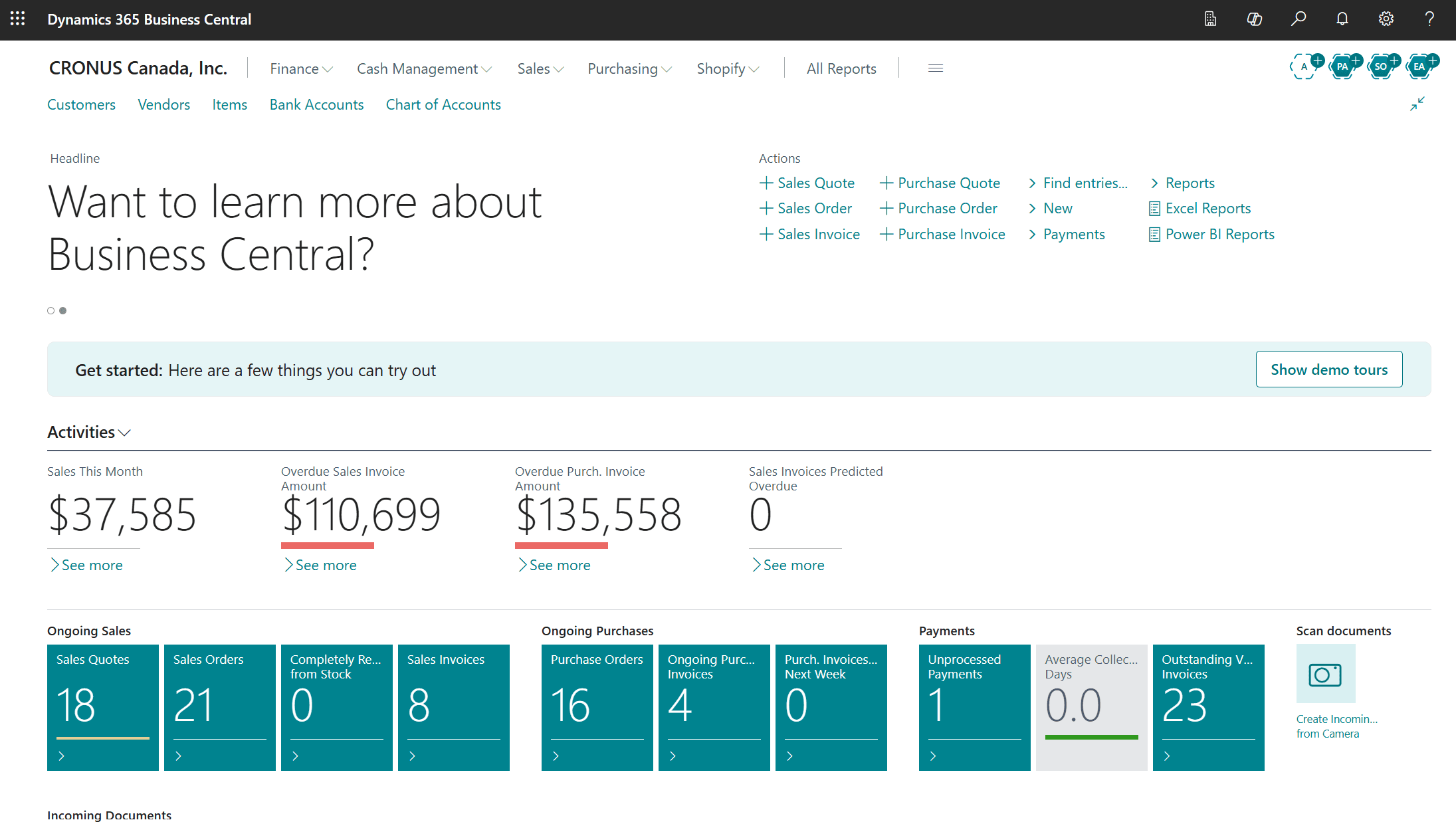
What Is Business Central?
Business Central is Microsoft’s cloud ERP for small and mid-sized organizations. Most growing companies end up running finance in one tool, inventory in a spreadsheet, and sales in a third system that never quite agrees with the other two. Business Central folds all of it into one platform, so month-end stops being an archaeology project and your team stops arguing about whose numbers are right.
For Canadian businesses that means GST, HST, and PST handled properly, CAD and USD running side by side for cross-border trade, and your data hosted in Microsoft’s Canadian regions.
GeniusX Tech is a certified Microsoft partner based in Brantford, Ontario. We implement Business Central, and we stay with you after go-live.
One System, Every Department
Business Central is built around how your teams actually work. Here's what that looks like department by department.
Operations
- Live visibility across every department
- Approval workflows in place of email chains
- A single data set, so nobody reconciles versions
- Dashboards that update without anyone building a report
Finance
- General ledger, payables, receivables, and fixed assets in one place
- Multi-entity and multi-currency, including CAD and USD
- GST/HST tracking with CRA-ready reporting
- Bank reconciliation against live feeds
Sales & Service
- Quotes and sales orders from the same customer record
- Full account history, visible to whoever picks up the phone
- Service contracts, cases, and warranty tracking
- Outlook integration, so email and ERP stop being separate jobs
Supply Chain
- Inventory across multiple warehouses and locations
- Purchase orders and vendor performance in one view
- Reorder points and demand planning that prevent stockouts
- Shipment tracking and landed cost for imported goods
Projects
- Job planning, budgets, and resource scheduling
- Committed versus actual cost as the work progresses
- Time and expense capture from any device
- Progress billing tied directly to project activity
Manufacturing
- Bills of materials and routings for every product you build
- Production orders tracked from planning to finished goods
- Capacity planning across machines and work centers
- Actual build cost against standard, run by run
Service Management
- Service orders and recurring maintenance on a dispatch board
- Technicians scheduled against skills and availability
- Installed equipment and serial numbers held per customer site
- Parts, labour, and warranty claims costed to each job
Subscription Management
- Recurring billing schedules for contracts and renewals
- Revenue deferred and recognized across the service period
- Usage-based and tiered pricing on a single invoice
- Upcoming renewals visible before contracts lapse
People
- Employee records, contracts, and reporting structure
- Absence and leave tracking
- Payroll-ready data for Canadian providers, including T4, CPP, and EI
- Works alongside your existing HR tools rather than replacing them
What Business Central Actually Does
These are the things that make it an operating system for the business, not just a nicer accounting package.
Real-Time Reporting
Every figure reflects what is happening right now, not what was true at last week's export. Finance closes faster, operations catch problems while they're still small, and leadership decides on current data instead of a stale snapshot.
Native Microsoft Integration
It connects directly to Microsoft 365 — Outlook, Excel, and Teams — plus Power BI, Shopify, and a long list of third-party platforms. You aren't ripping out everything you already use; you're finally connecting it.
Copilot and AI
Copilot is built in. It drafts sales orders from plain-language instructions, pulls line items out of supplier PDFs, suggests reorder quantities, and flags numbers that look wrong. The repetitive work goes away and your team spends its time on the calls that need judgement.
Security and Canadian Compliance
Role-based permissions mean people see only what their job requires, and audit trails record every change. Your data can be hosted in Microsoft's Canada Central and Canada East regions, which matters for PIPEDA obligations and for clients who ask where their records live.
Available Anywhere
Browser, desktop, and mobile, with the same data in all three. Whether the person is at head office, on a site visit, or working from home, they're in the same system.
Role-Based Workspaces
Each user lands on a home screen built for their role. Finance sees finance. The warehouse sees the warehouse. Nothing useful is buried and nothing sensitive is on display.
How GeniusX Gets You There
Getting Business Central right is less about the software than about who is beside you while you do it.
End-to-End Implementation
We map how your business actually runs, configure Business Central around it, migrate your data, train your people, and take you live. The plan is built to keep disruption off your operating floor.
Integration and Connectivity
If other systems are staying, we connect them properly — logistics platforms, payroll providers, e-commerce storefronts, customer portals — so data moves between them without anyone rekeying it.
Advisory and Fit Assessment
Not sure whether Business Central is the right call, or which modules you actually need? We sit with your team, learn how the business works, and give you a straight recommendation. Sometimes that recommendation is to wait.
Data Migration
Moving off QuickBooks, Sage 50, Sage 300, Xero, an older Dynamics version like NAV or GP, or a system nobody has supported in years? We handle the migration so your history comes across intact and your team doesn't lose the records it depends on.
Support and Managed Services
After go-live we're still here. Our team works Eastern Time, so when something needs attention you aren't waiting overnight for a reply from another continent.
Customization and Extensions
When Business Central doesn't do something your business genuinely needs, we build it as a proper AL extension — documented, and designed to survive Microsoft's update cycle instead of breaking on it.
Industries We Serve
Compliance requirements, reporting needs, and day-to-day workflow differ by sector. We configure Business Central around how your industry actually operates.
Frequently Asked Questions
Ready to see what Business Central can do for your business?
Book a call with a GeniusX consultant. We'll listen to how your business runs, ask the questions that matter, and give you a clear picture of what an implementation would actually involve.
- info@geniusxtech.com
- Phone
- +1 (519) 778-8901
- +1 (519) 778-8901
- Location
- Brantford, Ontario, Canada